Doing it by hand
- Callers sit idle while someone copy-pastes Maps listings
- Emails and WhatsApp on the website get missed
- No clean Excel to put on a dialer
- You finish one city and the day is gone
A google maps extractor is a Windows program that takes business listings from Google Maps and puts them in Excel. Google Map Lead Extractor is the google maps extractor software we sell: type a keyword, add cities, press Start Extraction, save the calling sheet.
Paid software · ₹2,000 per year · 1 PC · 12 months Independent software by MediaByteX. Not affiliated with Google.
Can’t talk now? Leave a number — we call you back
We got your details and will call or WhatsApp you soon (Mon–Sat, 10 AM–7 PM IST).
You know the slow way. Maps open. One pin. Copy name. Copy number. Jump to Excel. Back again. After 40 shops your eyes hurt and the file is still thin. The caller is sitting idle. That wasted hour is salary with zero conversations.
Three steps. Watch one extraction once if you are new. Same app people also call a google maps scraper — extract is the button, scraper is the search word. Open the scraper page if that is how you found us.
Type the Maps search the way a customer would. “Packers and movers” works better than a long sentence.
Jaipur on one line. Kota on the next. Pause and Stop sit next to Start. Scroll delay is there if listings load slow.
Hit Start Extraction. Save the .xlsx. Excel only — no CSV in the app. Give the file to calling.
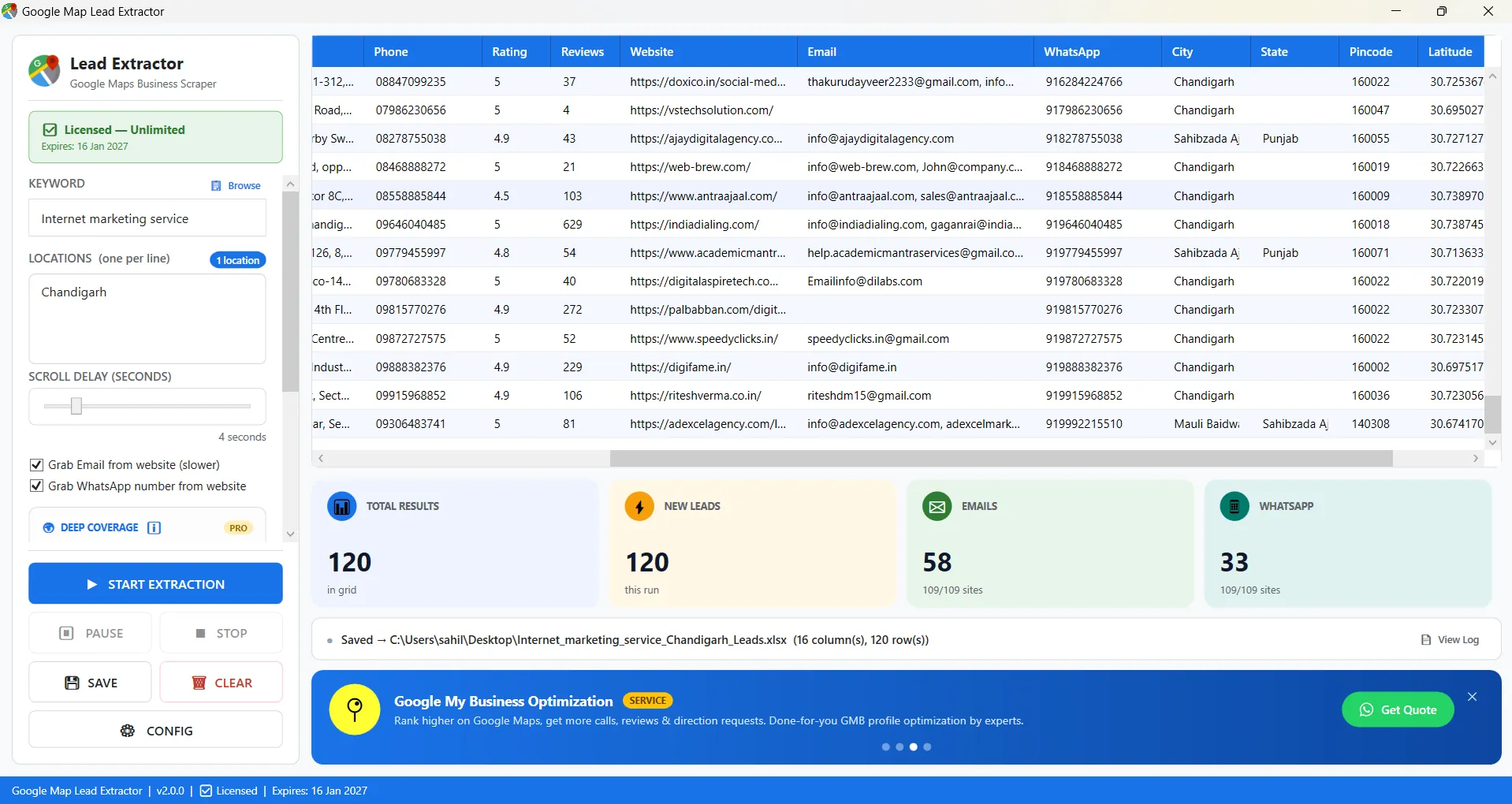
That is google maps to excel in the plain sense: rows, columns, a file. One sample run on “Internet marketing service” in Chandigarh gave 120 rows, 58 emails and 33 WhatsApp numbers after website grab was on. Your run will differ.
Reach the business on the Maps listing — phone ready for the dialer, not a dead directory page.
Turn on “Grab WhatsApp number from website”. People looking for a google maps lead extractor usually want this tick. Leave it off if you only need speed and the Maps phone.
Grab Email from website walks the business site. Slower. It will not invent a mail id that is not on the page.
Call the high-rated shops first. Rating and review count sit next to every lead.
One keyword, many cities. Lists stay organised with city, state and pincode.
Unlimited extractions on that one machine. Excel export. Software and license key within 30–60 minutes after payment.
Each row is a Google Maps business you can contact — when the listing has the field. 16 columns in the sample file. Excel only. If a shop hid the number, the phone cell stays blank.
Do not treat these as average yield. Treat them as the shape of the job.
An agency needs renovation leads around Vaishali Nagar. They run “interior designer” with Jaipur in the location box. Phone, rating and website land in Excel. Callers start with 4.5+ rated studios. Empty-phone rows they skip. How many rows you get depends on how many designers Maps shows that day.
A spare-parts shop wants local technicians, not a national helpline. They run “AC repair” for Coimbatore. City, pincode and phone sit in Excel. Next morning the nephew is calling. Some shops already buy from a rival. The file still beats a notebook.
See how “Internet marketing service” in Chandigarh becomes 120 rows your team can work.
Tap to play the demo. Enter keyword and cities, click Start Extraction, save Excel, start calling.
It is not an official Google product. Not a Maps partner. Not a way to “bypass” anything. A google maps extractor reads listings you can already see, and writes them to Excel.
It will not fill email and WhatsApp for every row. Website grab only works when the business has a site, and when that site prints a mail or a wa.me link. Hidden numbers stay hidden. Duplicate shops on Maps can still duplicate in your sheet. De-dupe before a big campaign.
Windows only. One yearly license, 1 PC only. Unlimited runs for 12 months on that machine. Need a second PC? Buy a second license. Some buyers type gmaps extractor on WhatsApp in a hurry. Same app. Same Excel.
After you press Save, the file name looks like the keyword plus the city. Sample: Internet_marketing_service_Chandigarh_Leads.xlsx. Skip rows with no phone. This is how you extract leads from Google Maps without killing the afternoon.
Stop buying a dump in March that is dead by June. Put a fresh Maps search on the dialer.
City-wise lists for a client WhatsApp campaign. No research intern copy-pasting pins.
Clinics, shops, offices in your city. Offer while the list is still warm.
Pick a category, extract contacts, book meetings. Google Map Lead Extractor stops at the file. Your team talks.
1 PC. Excel only. Message +91 96475 04140 on WhatsApp. After payment, software and license key in 30–60 minutes.
Tell us what you want to extract. We call or WhatsApp you from +91 96475 04140, Mon–Sat, 10 AM–7 PM IST. Paid software: ₹2,000 per year.
We got your details and will call or WhatsApp you soon (Mon–Sat, 10 AM–7 PM IST).
Windows software that takes businesses you can already see on Google Maps and saves them to Excel. Google Map Lead Extractor is ours. Type a keyword, add cities, press Start Extraction, Save. Excel only.
Type the search (example: interior designer), add one city per line, press Start Extraction, then Save. You get an .xlsx file. There is no CSV export in the app.
Only if you tick Grab WhatsApp / Grab Email from website, and only if the site actually has them. Maps phone can still fill when those ticks are off. In one Chandigarh sample: 120 rows, 58 emails, 33 WhatsApp. Not a promise for your keyword.
Yes. Add one city per line. Same keyword, many cities.
No. Not a Google product. Not a Maps partner.
No. If Maps hid it, the cell stays empty. Skip those rows before calling.
Yes, it is a Windows desktop app. One yearly license works on 1 PC only. Unlimited extractions for 12 months on that machine. Need a second PC? Buy a second license.
Message +91 96475 04140 on WhatsApp. Price is ₹2,000 for one year. After payment we send the software and license key within 30–60 minutes.
Google Maps leads in Excel. ₹2,000 for 12 months, 1 PC. Software and key in 30–60 minutes after you WhatsApp +91 96475 04140.
Talk to us on WhatsApp Call +91 96475 04140Prefer a call back? Leave your number.
We got your details and will call or WhatsApp you soon (Mon–Sat, 10 AM–7 PM IST).